
AI-Powered Micro Design Sprint
12 plug-and-play prompts to help any team turn an idea into an AI concept in under 20 minutes

This sprint is a quick way to turn a vague AI idea into something your team can see and discuss. In 90 minutes you move from problem to draft solution with help from your AI assistant.
Use it in workshops or team meetings. At each step simply paste the prompt into your AI tool, add your context then edit the output together. The aim is not perfection. The aim is a shared starting point you can improve.
Have fun!
Step 0 - AI Use Case Card
For [specific customer or user group] who experience [current problem or unmet need], which causes [pain, risk or missed opportunity], we believe there is an opportunity to use [AI capability] to help them achieve [desired outcome].
Today, this is handled through [current process or workaround]. The opportunity sits within [business domain] and supports [business goal, KPI, OKR or strategic priority].
The solution would require [key data] and would need to work with [systems, platforms or processes]. Key considerations include [legal, compliance, privacy, security, bias or trust risks].
This opportunity is best described as [AI-assisted, AI-augmented or AI-powered].
Step 1 – Identify Problem
Prompt A
We are [team] at [company]. Our AI challenge is: [paste challenge text]. Break this into 5 to 7 clear problem statements that start with “How might we …”.
Prompt B
Based on this AI challenge [paste challenge] describe the current situation, what is broken and what success would look like in simple language for a non technical audience. Also ask me any question to better understand the root course of the problem.
Step 2 – Define Users & Needs
Prompt A
For this challenge [paste challenge] list the key user groups who are affected. If you are unsure - please ask. For each group describe their goals, top 3 frustrations / pain points and outcomes they are after in 3 short paragraphs with bullet points.
Prompt B
Turn this challenge into 3 short user stories in the format “As a [user type] I want [goal] so that [benefit]”. Use realistic details from the [team] at [company]for this context.
Prompt C
Create a realistic user persona for one of the key user groups affected by this challenge: [paste challenge].
Use relevant details from the [team] at [company] and include:
Name, age, role and short background
Main goals and motivations
Top 3 frustrations or pain points
Typical behaviours, needs and level of confidence with technology
A short quote that captures their perspective
What they would need to see or experience to trust a new solution
Then create a clear description for a visual avatar of this persona. Make the persona realistic rather than stereotypical. This persona will be used for future concept evaluation and simulated synthetic user testing.
Step 3 – Brainstorm Solutions
Prompt A
Staying with the same challenge [paste challenge] suggest 5 AI supported solution ideas. Make them varied across people, process, data and tools. One headline + one sentence per idea.
Prompt B
Give me 5 wild and unconventional AI ideas for this challenge [paste challenge] that might sound unrealistic at first but could inspire fresh thinking.
Step 4 – Select Concept
Prompt A
Here are the ideas we like best: [paste 3 to 5 ideas]. Compare them in a quick table with columns: “Idea”, “Impact”, “Effort”, “Risk”, “Notes”. Score each from 1 to 5 and recommend one front runner and one runner up.
Prompt B
Using these ideas [paste ideas] write a short paragraph that argues which idea we should take forward today and why it fits our users and our organisation.
Step 5 – Outline Features
Prompt A
For the selected idea [describe concept] list the core features as bullets under these headings: “Must have this week”, “Nice to have later”, “Not in scope”.
Prompt B
Turn this concept [describe concept] into a simple user / process flow. Describe the steps a typical user takes from start to finish and note where AI is doing work in each step.
Step 6 – Mock-up Solution
Prompt A
Describe a low fidelity prototype for this concept [describe concept]. Explain what 3 to 5 screens or moments would look like and what text or data would appear on each screen. Or explain the steps and interactions if it would be a service offering.
Prompt B
Write UI micro copy for the main screen of this solution. Include a title, a one line explanation, 3 key actions or buttons and any helpful microcopy or tips.
Prompt C (image based mockups or use openAI canvas feature)
We want to create a visual mockup as an image for this AI solution:
[paste concept] and this user flow:
[paste user flow steps].
Design a [low fidelity wireframe or high fidelity UI mockup] with [number] key screens:
[screen 1 purpose, for example: dashboard summarising key insights]
[screen 2 purpose]
[screen 3 purpose]
For each screen describe what the image should show including layout and main sections with example data labels and any AI specific elements such as prompts suggestions or alerts. Use a simple clear style that fits our work environment.
Step 7 – Refine & Fill Gaps
Prompt A: Create the Interview Guide
We are running an AI-powered design sprint.
Here is our challenge:
[paste challenge]
Here is our selected concept:
[paste concept]
Here are the personas we created earlier:
[paste personas]
Create a short synthetic user interview guide to test whether this solution is useful, clear and realistic.
The guide should include:
1. A short intro script
2. 6 to 8 interview questions
3. Questions that test the problem, the current pain, the proposed solution, trust, usability and adoption
4. At least 2 questions that could reveal why the user might not use the solution
5. A final question asking what would need to change for this solution to become a “yes”
Keep the questions simple and practical.
Write them in a way a workshop team can use straight away.
Prompt B - Run Synthetic User Interviews
We are running synthetic user testing for an AI-powered design sprint.
Here are the personas we created earlier:
[paste personas]
Here is the concept we want to test:
[paste concept]
Here is the interview guide:
[paste interview guide]
Act as each persona, one at a time.
For each persona:
1. Stay fully in character
2. Answer each interview question honestly from that persona’s point of view
3. Include realistic concerns, frustrations, objections and emotional reactions
4. Do not be too positive. Be critical where it makes sense
5. Mention what would make the solution more useful, trustworthy or easier to adopt
Use this format:
Persona name:
Role / situation:
Overall reaction:
Question-by-question answers:
Main objections:
What would make this solution better:
Quote we could use in our pitch:
Prompt C - Synthesise the Findings and Improve the Concept
We have completed synthetic user interviews for our AI-powered design sprint.
Here is the original challenge:
[paste challenge]
Here is the concept we tested:
[paste concept]
Here are the synthetic user interview responses:
[paste responses]
Analyse the findings and give us a clear synthesis.
Please include:
1. Top 5 insights from the interviews
2. What users liked
3. What users did not understand
4. Main objections or adoption blockers
5. What we need to change in the concept
6. Which feature or part of the solution should be removed, simplified or added
7. Updated version of the concept in 5 bullet points
8. One sentence value proposition based on what we learned
9. The biggest risk if we build this without further testing
10. The next small experiment we should run in the next 48 hours
Be direct and practical.
Do not make it sound better than it is.
Step 8 – Value Proposition
Prompt A
Create 5 short value proposition options for this solution [describe solution] in the format “For [user] who struggles with [problem] our solution [promise] so they get [benefit].”
Prompt B
Rewrite the value proposition for three audiences: [persona 1], [persona 2], and executive management. Each version should be one sentence in plain language.
Step 9 – Share your Solution
Prompt A
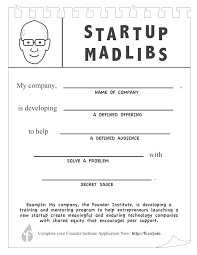
Quick 1 Minute Mad-lib format Pitch
Describe [SOLUTION] in the MadLib format. The format is as follows:
We have observed (problem)
For (target customer)
Who (statement of need or opportunity)
The (product name) is a (product category)
That (key benefit, compelling reason to buy)
Unlike (primary competitive alternative),
Our product (statement of primary differentiation)
Prompt B
2-Minute Pitch (Mad-Lib Style)
The Problem
We have observed that [describe the challenge tackled].
This impacts [describe who it affects and how].
Your Solution
Our solution [prototype name] is a [type of concept/product]
that [describe how it improves the traveller experience].
Unlike [current process or alternative], it [key differentiator].
One Key Insight
During testing, we discovered [key learning or surprise].
This insight changed our thinking by [explain how or why].
Next Steps
Our next step is to [describe future development or experiment].
This will help us [state the impact or next goal].
Step 10 – Risks & Constraints
Prompt A
For this AI solution [describe solution] list the top 8 risks or constraints across data quality, ethics, security, change impact and cost. Suggest one mitigation for each risk.
Prompt B
Write a one page style risk summary for leaders that explains what could go wrong with this solution and what simple guardrails we can put in place early.
Step 11 – Success Metrics
Prompt A
Suggest 6 simple metrics that would show if this solution is working for our challenge [paste challenge]. Include at least one metric for business impact, one for user adoption and one for quality.
Prompt B
Design a tiny experiment we could run in 2 weeks to test this idea. Describe the test, who is involved, what we measure and what would count as a clear signal to continue or stop.
Step 12 – Next Steps & Ownership
Prompt A
Turn everything above into a 10 point action plan for the next 90 days. Include rough timing and who in a typical organisation (role title) should own each action.
Prompt B
Write a one minute spoken pitch that a team member can read out loud to the room. It should cover the problem, users, our AI concept, the value and the next step we want approval for.
You now have a small kit for rapid AI-powered concepting. Any time a new challenge appears run it through this sprint to sketch what an AI supported solution might look like.
Adapt the prompts to your language, context and keep the versions that work best. Over time you will build your own prompt playbook plus a team that is more confident working side by side with AI. Have fun.
Ready for AI?
Bring it on!