

When I first heard about Scrum, it sounded like something only big software teams used. But over time, I realized it’s a game-changer for startups too. Scrum taught me how to stay flexible, adapt quickly, and deliver results without getting bogged down in endless planning.

In this post, I’ll share how I’ve used Scrum to tackle the chaos of building startups, why it’s such a powerful framework, and how you can use it—even if your idea is still on the back of a napkin. Whether you’re building a product or just trying to stay focused, Scrum can help you move faster and smarter. Enjoy - I hope it helps you!
What is SCRUM
Scrum is a methodology to deliver new software capability every 2 to 4 weeks. It is rooted in agile project management, but primarily used for software development. The intent of it is to develop higher-quality software faster than by using traditional means.
Scrum is considered to be the most popular agile method in the world today. Seventy percent of software teams use Scrum, according to the 12th annual State of Agile report. Scrum helps software teams move fast in the face of ambiguity and complexities, resulting in higher productivity, reduced time to market, better team collaboration and better quality products.
The key to Scrum that makes it so effective is the fact that information about every aspect of the software development project is made transparent. People on the team can adapt based on real-time information and current conditions – not on predictions or outdated information.
Furthermore, Scrum lends itself to enable faster adjustments because frequent inspections ensure progress, and detection of variance is accomplished early on in the process.
The term “scrum” is also used in the game of rugby, referring to when all the players put their heads together to fight for the ball. In a sense, Scrum is similar – the software development team, technical and non-technical alike, “put their heads together.”
A best practice for Scrum is to allow the team to self-organized around people’s skills, experience, style and personality tendencies. Under the Scrum umbrella come Sprint Planning, Daily Scrum, Sprint Review and other components of the methodology. Sprints, for example, are periods of time when software development is actually done.
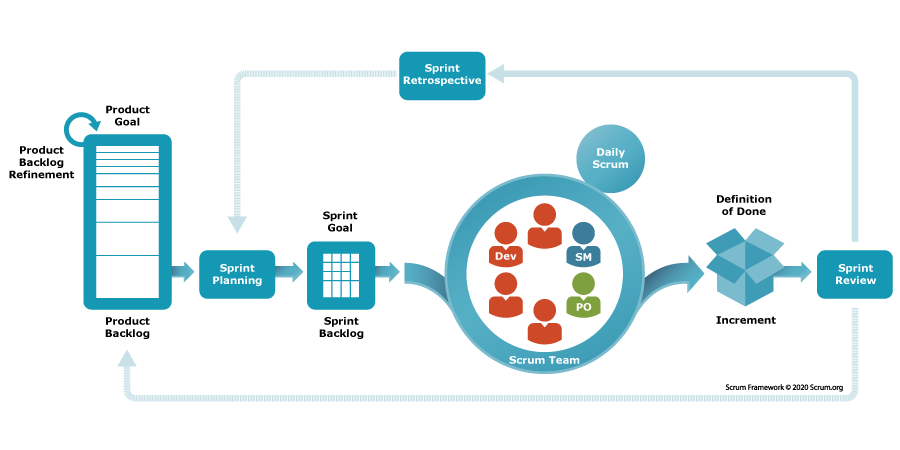
A Scrum team does not have a “leader” in the traditional sense. It does have a “product owner” and a “scrum master” (who represents the customer), but the Scrum team is essentially self-managed, which is motivating for people who want more freedom to be creative and participate fully.
Although Scrum may at times seem like a hard fit for early stage startups, even startup ideas, you should use learn this framework and test it out with your idea so that you can see what works for you now and how it can continue to work for you later once your idea becomes a full fledged business. Nevertheless, startups that have adopted Scrum will often experience the following benefits:
Increase in Productivity
Better- Quality Products
Quick releases keep the team motivated
Happier users/stakeholders as they can see progress in a short amount of time
Semi – prescriptive approach help remove the ambiguities
Defining Your Product
You may have an idea in your mind about the product you want to develop, but “defining” your product essentially means to write it down. Writing helps to think the product through. Writing forces you to come up with a strong definition of your product idea. It gives you the opportunity to observe your own thoughts about the product and evaluate it.
The purpose of this post is simple: to give you a framework for how to think about defining your product, and to give you a template statement that will give you some structure for your product definition. If you follow the steps to these two things, you will go a long way to defining your product.
Here’s the framework: answer the following questions (either alone or, if you have a team right now, with your team).
Who are you targeting to be your customers?
What are their pain points or problems?
What is your solution idea (just in one sentence)?
What is the most important benefit to what you will offer?
What are the competitive alternatives to your product (or potential product)?
Why is your product better than the competition?
After you have answered those questions, you will be ready to fill out the following template that serves as a product definition statement.
For _________________, who need _______________, our product provides _________________________. Our product is better than other solutions, such as ______________ because ______________________________________________.
People in your startup will be so happy in the future when they see that you have a clear definition of your product. This exercise may sound simple, but it’s highly important. Don’t be fooled by the simplicity of it. Keep working on your product definition. To get it to be the best that it can be, you will need to continue to work at refining it.
Customer/User Persona
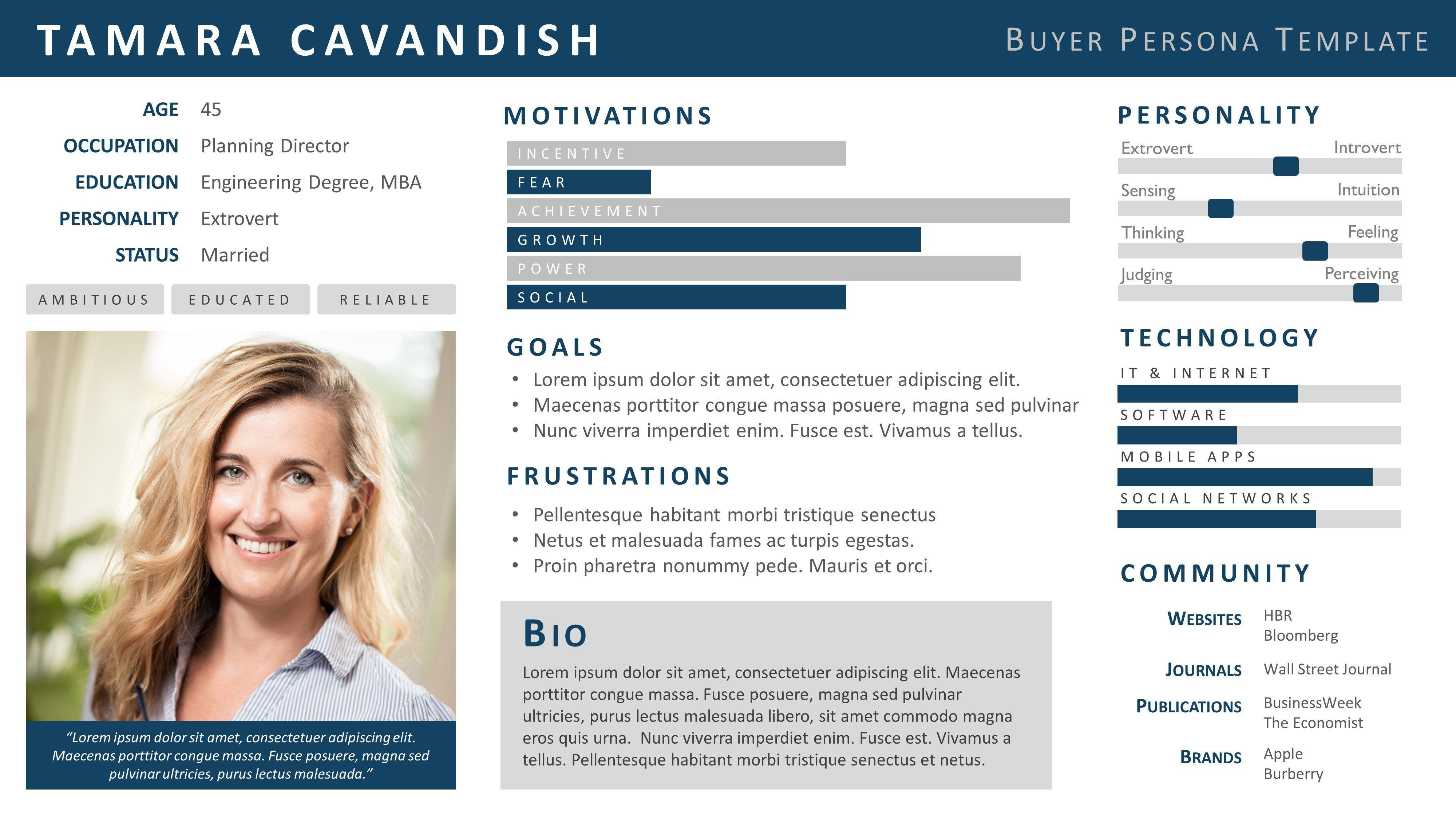
A customer persona – also known as a user persona or buyer person – is a profile of the type of customer you want to understand and sell to; the “persona” is developed based on real user research that you or your team need to do.
The characteristics of the users are combined into a composite of a “persona” that represents the major attributes of the customer. It creates a realistic representation of your target customer. A persona gives insight into the way a target customer is thinking and doing as they consider how to solve their problem.

A customer persona is like a fictional character in a novel to make the customer “come alive” on the screen, but it gives a composite of real people with goals, values, backgrounds. It depicts the target user’s real behavior patterns, attitudes, motivations, priorities and expectations as they relate to a product.
Rather than have the target customer seem like a formless entity somewhere out there, the customer persona “personalizes” the customer type, helping teams to be aligned on how to communicate to the customer.
There are different types of personas:
Goal-directed persona – common goal of customers consolidated into one “persona”
Role-based persona – the role of the people in an organization
Engaging persona – common emotions, psychology and/or background
Fictional persona – emerges from the experience of the UX design team
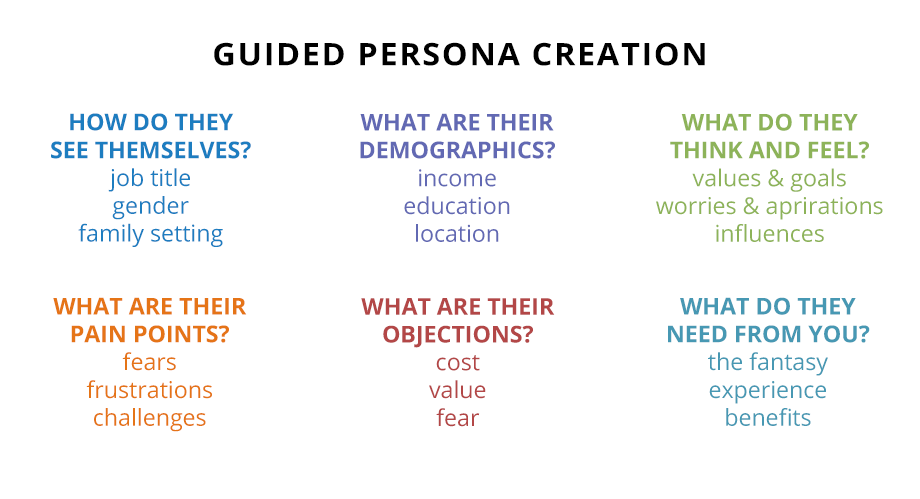
The steps you can take to design your personas are as follows:
Collect data
Establish hypotheses with support of your team
Describe each persona
Create scenarios or situations for your personas
Continually refine and update your personas
You can give a name to each persona. One of your personas could be “Barry the IT guy.” You can build a story around him. His qualities represent the qualities of the people you want to sell to. Build his persona based on your research of users. Use your imagination to think about the likes and dislikes of Barry the IT guy. Make the persona as realistic as possible.
This use of customer personas is common among top marketing professionals across the world, and it is also prevalent across startups of all stages. As you narrow in on your target customer, apply this knowledge to develop the specific customer and user personas for your idea.
How to Write a User Story
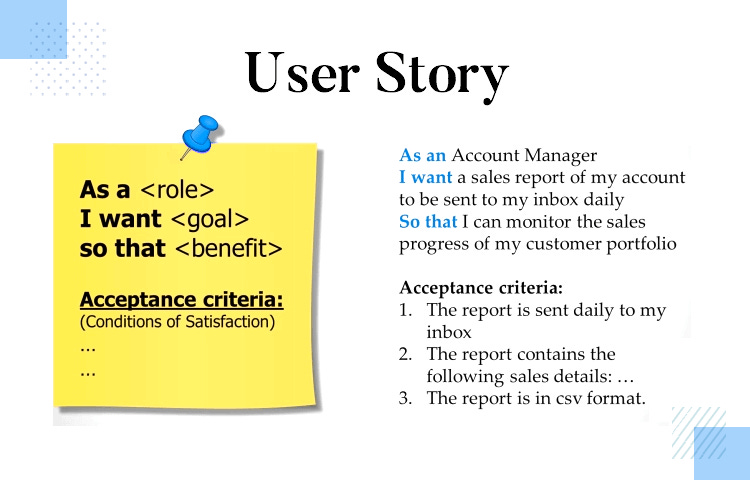
A user story describes a product’s functionality from a user’s point of view in a simple and concise way. It describes what a user needs and the value they will get from a product. For a startup, users stories can help you define your product more clearly.
User stories are extremely useful for product discussions between technical and non-technical team members. These stories are a foundation for collaboration and communications across a team. A user story is focused on what matters most to the user.
User stories are commonly used in agile engineering. They help with product scope discussions and can be a starting point into a deeper technical discussion.
You will be able to better articulate the functionality of your product if you develop a set of well-written user stories with no technical jargon. Your focus should be on providing clarity about product features. It’s the “what” – not the “how.”
The following are two possible formats that you could use for your user stories:
As a (role or person), I can (goal / need)___ , so that _(why).
OR
As a (particular class of user), I want to be able to (be able to perform / do something), so that _____(I get some form of value or benefit)_______.
User stories are affirmed by acceptance criteria, which ensure that user stories are completed with the full range of functionalities that a product owner has specified for the user (see module on “Acceptance Criteria”). As a next step, take some time to write your user story (or stories!) in order to better define you product features and gain a clear understanding of who your users truly are and why they use the product you offer.
Acceptance Criteria – Knowing When It’s Done Right
Acceptance criteria is a list of requirements that ensure that all user stories are completed correctly and comply with a product owner’s (or client’s) expectations, including all possible scenarios. Acceptance criteria specifies the conditions in which a user story is fulfilled. It needs to be established up front, not after the development stage has started.
Software development teams use acceptance criteria, coupled with user stories. Development teams use acceptance criteria to define the boundaries of a user story. It is completed when the application functions are confirmed. Acceptance criteria also ensures that the development team is in synch with the product owner – the team knows what conditions need to be met, while the product owner knows precisely what to expect from the software.
Furthermore, acceptance criteria are used for positive / negative testing designed to check if the system works as expected. The proper dividing up of user stories into tasks is also allowed under acceptance criteria.
Usually, either the product owner (client) or the development team writes the acceptance criteria.
Types of Acceptance Criteria
The two most popular types of acceptance criteria are rules-oriented and scenarios-oriented. The rules-oriented type comes in the form of a list. The scenarios-oriented type comes in the form of scenarios that illustrate each criterion.
Agile teams like to use the scenario-oriented type because it helps envision use cases, communicates the requirements and is useful in acceptance testing. The common template for this type is the Given/When/Then format. It helps you describe the system’s behavior up front. And it is okay to write in the first person “I” to keep the user’s perspective front and center.
Here is an example:
Given that I am a new user to a site;
When I am on the “Sign Up” page and fill out all my information,
Then I gain access immediately and receive a confirmation email.
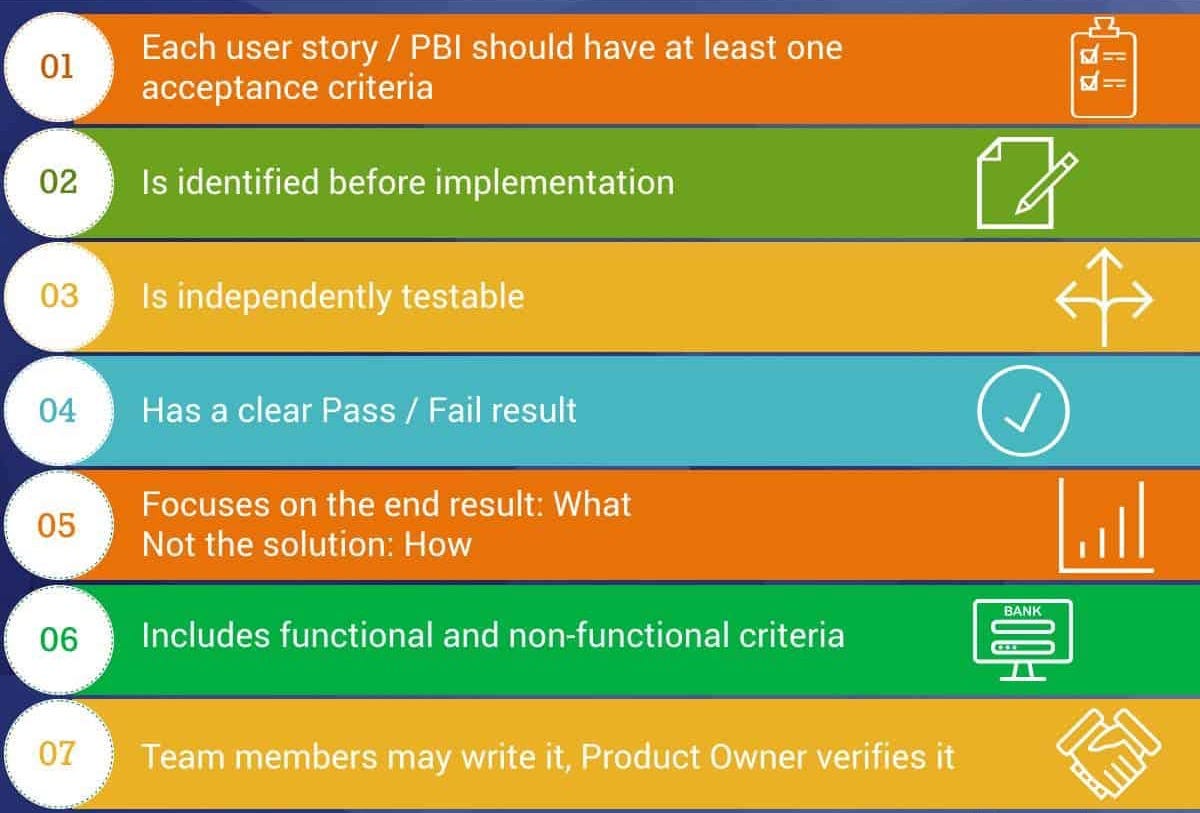
The following are additional tips for you to create good acceptance criteria:
Make the criteria realistic and something that people can achieve
Don’t try to describe every detail
Try to build it based on consensus by coordinating with everyone involved in the project
Establish measurable criteria so you can stay on budget and within time constraints
Maintain a well-defined criteria
Provide checklists to see the user stories that are covered by the acceptance criteria
Acceptance criteria and user stories go hand in hand, and you must align.
What is a Backlog
A backlog is a prioritized list of everything – all features – that is known to be required to be in the product. It is a single source of requirements, including any changes to the product.
The backlog is a “living document.” It evolves as the product evolves. The backlog is never complete. It is constantly changing to identify what the product needs, whether to stay competitive, or to be more useful. A product backlog always exists as long as the product exists.
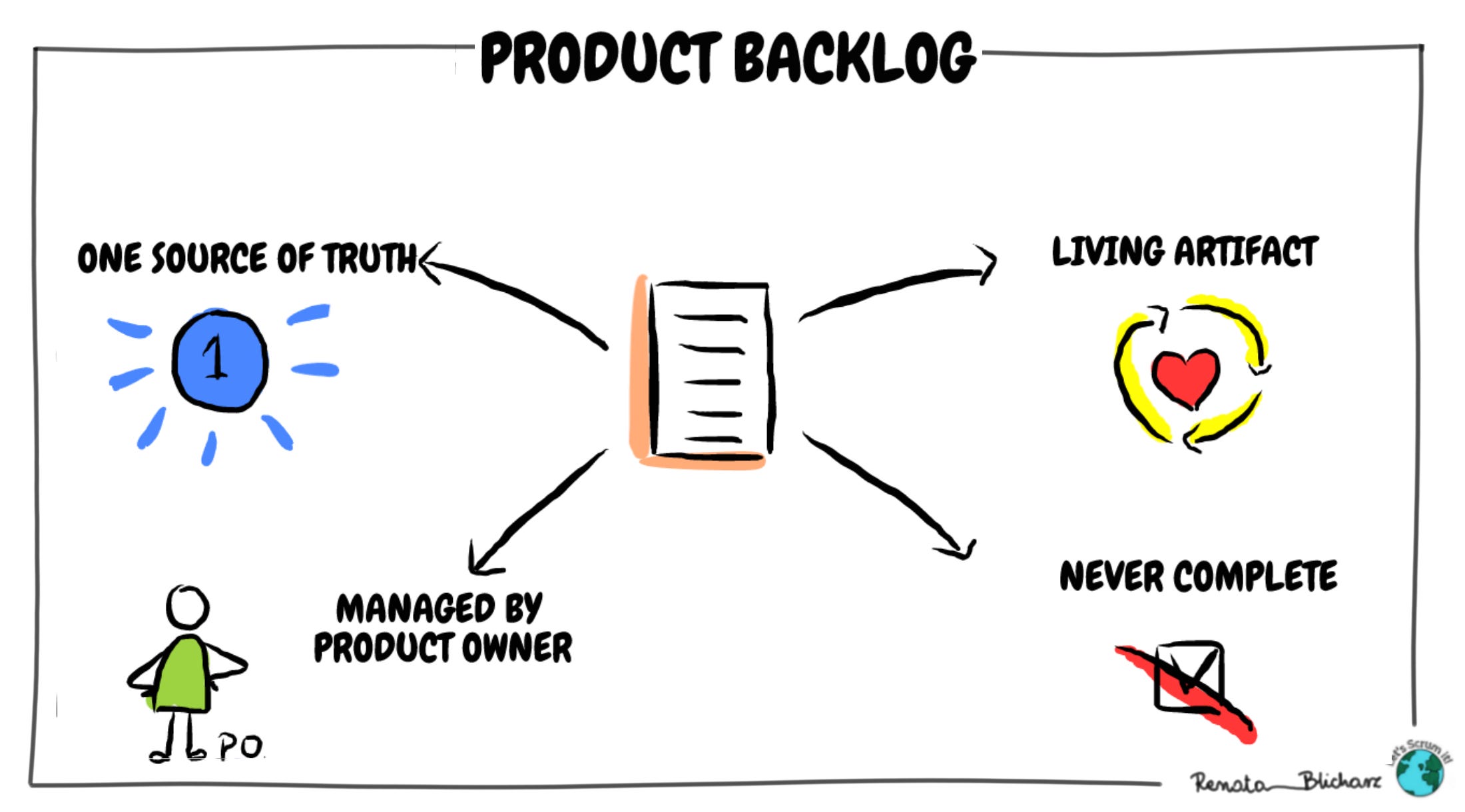
One important characteristic of what is added to a backlog is that any entry must add value. Indeed, it must have some degree of customer value. Otherwise, it will not be added to the backlog. All entries are prioritized. No low-level tasks are included.
The backlog needs consistent attention. The person who is responsible for the product backlog is the product owner. Product development teams use backlogs. Specifically, Scrum software development teams use backlogs to help clarify the product requirements and to get team-wide buy-in.
You as a startup founder rely on the backlog to keep track of what the product development team is prioritizing. It’s not an overstatement to say that it’s crucial to effectively managing product development.
Add “backlog” to your vocabulary as a startup founder because sooner or later you will be working with it, whether it be on a specific product, project, or initiative.
What is JIRA
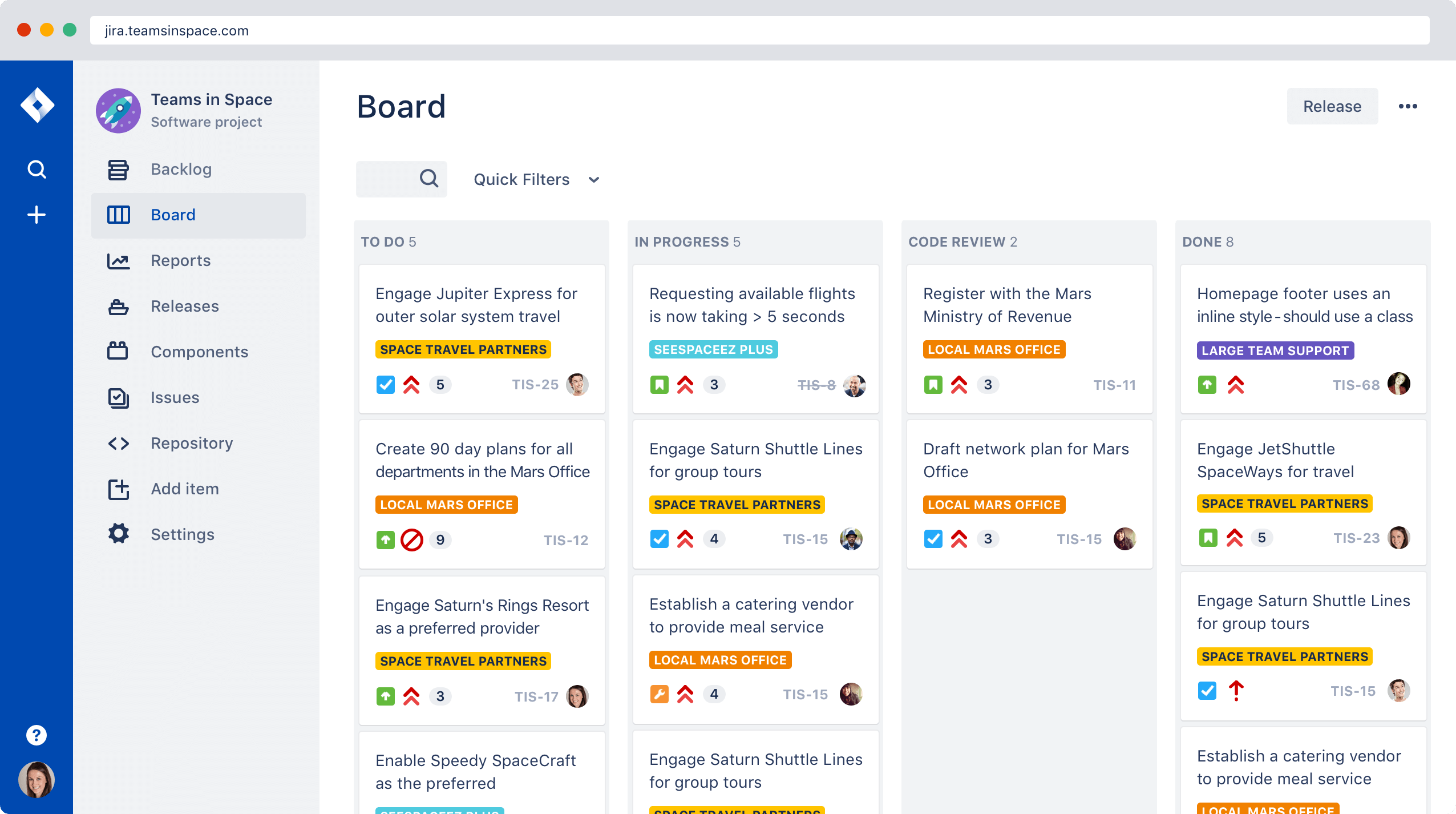
JIRA is a software development tool used by agile teams to plan, track and release high-quality software. Helping teams to manage their work, JIRA improves team performance based on real-time, visual data that your team can put to use.
Plan
Plan “sprints” (Scrum)
Create user stories
Distribute tasks across the team
Track
Priorities
Complete visibility
Release
Ship with confidence
Up-to-date information
The JIRA platform has different options, including:
JIRA Software
JIRA Service Desk
JIRA Ops
JIRA Core
Each one comes with built-in templates for different use cases, enabling teams to work together better. The benefits for a product development team at a startup are already proven.
Backlog Management & Burndown
You may be good at delegating project management to other people who are skillful and trained in it, but there are a few things about backlog management and burndown that you should know.
Managing the Backlog
Prioritization is the key to good backlog management. You and your team may have 40 ideas for features in the product, but you need to narrow it down to the top 5-7, for example, that are of the most strategic value. You then schedule those top priorities for the next “sprint,” an agile term that refers to when software development is done.
You should also prioritize a second tier of tasks on the backlog – to be addressed after the top tier of priorities. Everything else – all those lower-priority items – should go on a different list and not be on the backlog. This reiterates that good backlog management is to keep it lean.
If your backlog has everything and is overloaded, you’re in trouble. Nothing of strategic value will get done well or on time.
Another best practice is to develop a scoring system that gives points to each task and how much resources are needed for each. By using points, you can know which tasks will need more resources, such as more hours for the engineers to work on a certain task.
The Burndown Chart
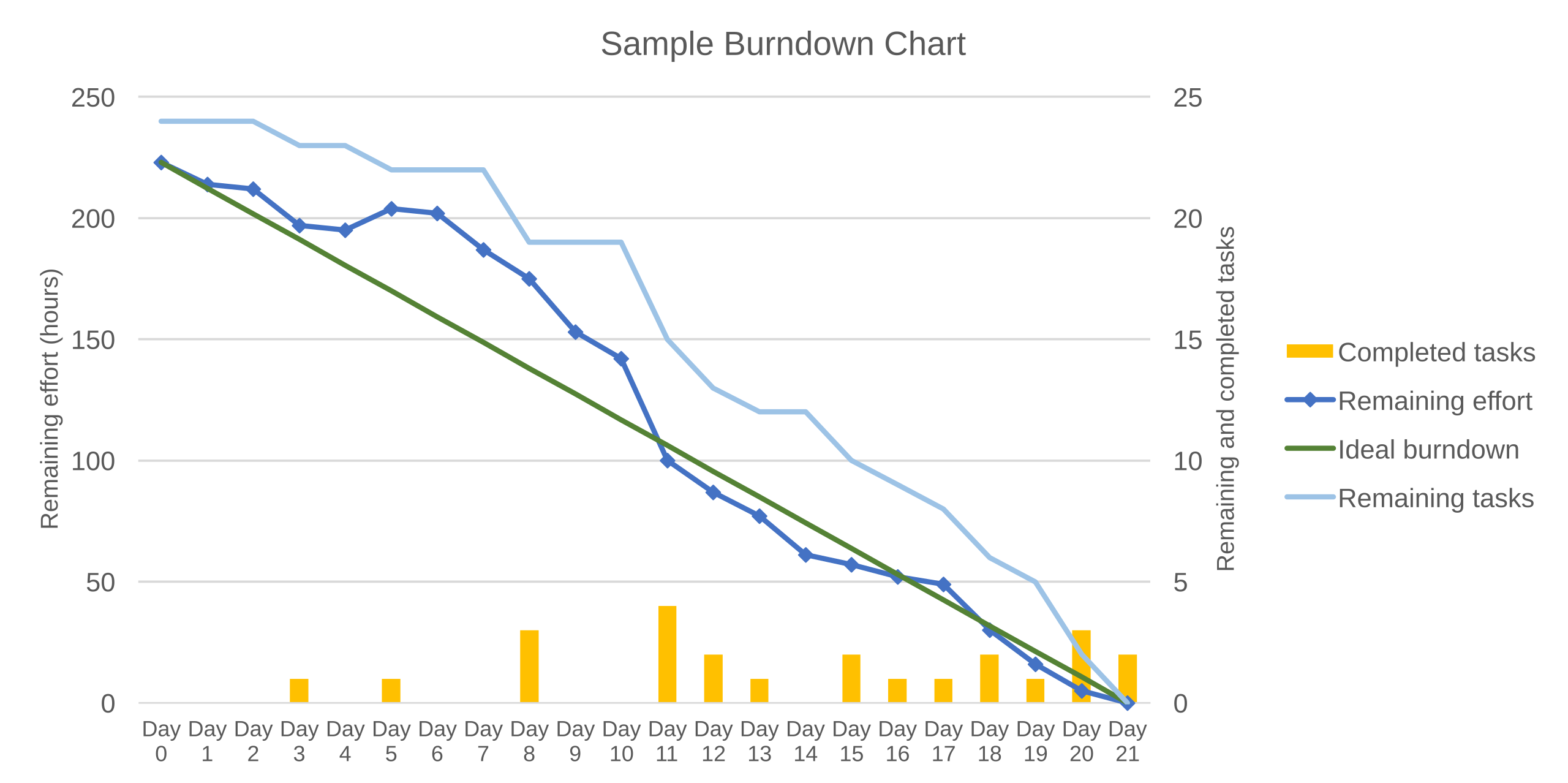
The “burndown” is an interesting agile term that refers to the amount of time left to get the project completed. The purpose of it is to keep the project on track to deliver the product in a desirable timeframe. The chart is a visual representation of this tracking of time against work progress.
In the two graphic examples below, you see the burndown chart shows the “ideal” timeframe for completion (red line) and the actual line depicting the time remaining (blue line). It shows the completed work each day against the projected timeline for the whole thing. Teams use this chart to measure progress and to keep track of the “velocity” of the team’s work.
What we glean from good backlog management and burndown are:
Visualization of time, tasks and resources is common in project management
It’s a race against time to develop the product with limited resources
Prioritization is one of the most important things in project management and product development
Data that tracks the work being done gives the project manager up-to-date information to make adjustments, reset expectations, reallocate resources and plan accordingly
A backlog is a living document
Agile tools and methodologies work together to increase efficiencies
Usability Research
Usability research is about testing a product for ease of use. If you have a website or app that is hard for users to use, then it’s not “usable.” Users will not want to use it. However, even if you start off with poor ease of use, all is not lost. This is where usability research comes into play.
The intent is to get real users to try your product and give you direct feedback on how easy it is to use. The process to improve the usability of your product is iterative – meaning that you show users a version of it; you get feedback; you act on the feedback and incorporate improvements to the interface of the product; and you then get more feedback from users to continue its evolution into a truly simple-to-use, intuitive product.
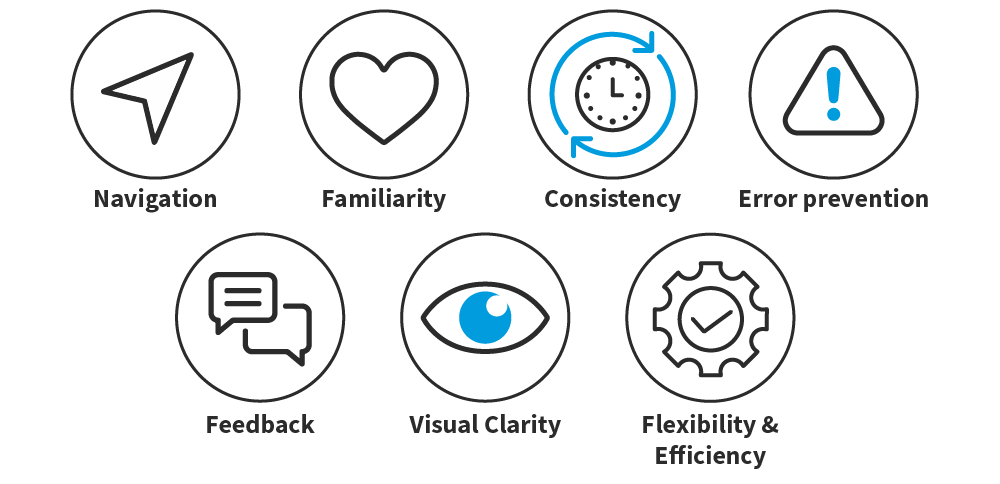
Users may like the way information is organized on your app but hate the way it takes two steps to go backwards if they make an error. This kind of feedback on the usability of the app would lead you to work to trim down the process to one step. Or if you discover during usability research that users think it is difficult to post messages, you can make improvements.
People don’t want to have to “think” when they are using a website or app. They just want to do things with as few steps as possible and with actions that seem “familiar.” For instance, if you create a new social media site, having functionality and design that is similar to today’s most popular social networks (without directly copying them, of course) would give you a higher usability score.
How to get feedback
Users don’t just come to you for usability testing. You have to go to them; you have to find them and recruit them. You can start off with people you know if your product is for the general public. If your product is for a certain category of customers (i.e. healthcare professional), then you’d need to recruit healthcare pros to give feedback on your product.
Here’s what you can do:
Design a survey (i.e. using SurveyMonkey, TypeForm) and send it to your target audience via social media or email
Post the link in online groups that center on a topic related to your product
Ask people you know for referrals and to share the link
Ask people if you could give a live demo and ask them for their feedback in real time
Many people will be interested to see an innovative new product and be excited to be part of the evolution of it by giving feedback. They will be honored that you asked them for their expertise. But you don’t want to overdo it or overstep the boundaries. It’s not polite to assume that these people will give you all the time in the world. You should ensure them that the survey will only take a few minutes. You may even want to give them an incentive, such as free (limited time access) when the product is “completed.”
You also want to make sure that people are giving you genuine feedback – not just to make you feel good. You need to invite constructive criticism, which is why it is better to get feedback from objective users, not friends and family – even though friends and family could help you out and be a source of inspiration and encouragement in the beginning.
How often to do it
There is no one set time for how frequently to do usability research. It depends on the product and how fast you and your team can make improvements.
If you can make improvements every two weeks because of using agile methods with “sprints,” then you could do usability testing every two weeks. You will want to get feedback as soon as possible, so the development team can continue to refine the product.
The goal is to make your product as easy to use as possible. Just look at the most popular sites and products – Facebook, LinkedIn, Twitter, iPhones, MacBooks, Amazon, Google, Microsoft – all easy to use. All are “usable” and that’s why they make billions of dollars. It takes an intense process and openness to hard feedback to get to the highest degree of usability.
Do your research and stay committed to it.
Initial Testing Methods – A/B Testing
A/B testing – or split testing, as some prefer to call it – allows you glean reliable, actionable data you can base your decisions. A/B testing simply means creating two (or more) variations of your product, A and B, and then testing them out to see which works best and yields better results.
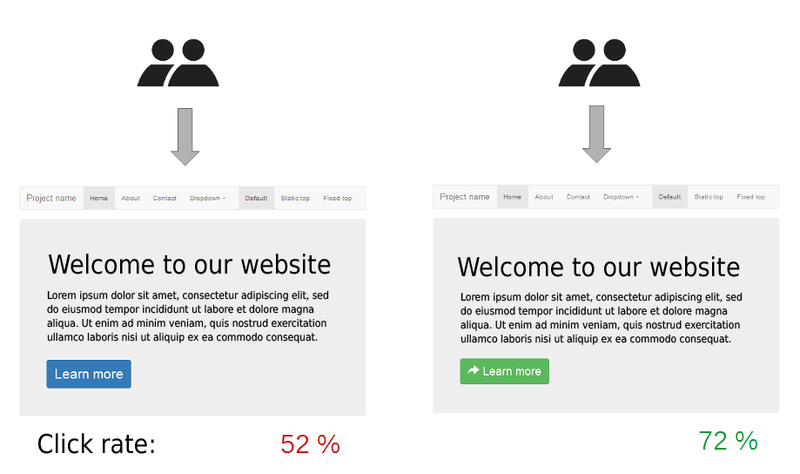
The variations could be as simple as different colors or as major as completely different approaches. Each design can offer its own set of benefits. Essentially, you are putting option “A” and option “B” in front of users to test out whether different elements are better at motivating users to take an action that will benefit your company.
This is different than Usability Testing, which is to test the ease of use of a product. A/B does not require you to recruit and survey users. You use live, real-time traffic on your site to test different versions. This makes the results of A/B Testing quantitative in nature. It focuses on answering the question, “How many?” Whereas, Usability Testing is more qualitative, with people giving you their opinions and impressions.
For example, if you see that users respond to a “call for action” twice as often in the A option, compared to the B option, then you have valuable insight to show that option A is more effective in motivating people to take action and engage with your site. This insight from A/B Testing can save you time, money and effort.
You can use a variety of different tools for A/B testing and it might be difficult to know which one that is best for your startup. Keep in mind that the solution you ought to use is one that will make you marketing efforts autonomous without added technical constraints. To this end, focuses on using A/B testing tools that are intuitive and easy to set up. What’s more, opt for testing solutions that can do more than simple first tests on to much more complex and meaningful scenarios with front- and back-end support.
You will learn very fast that A/B testing allows you to learn about your product and audience in a more rigorous manner. Once you start to perform A/B tests on your idea, product, and business, pay close attention to what you want to learn about your product and your audience in order to determine what to test. Your revenue is the summary of the decisions made by your audience, including both customers and potential customers. Done right, you will get very close to understanding what your users want and how they are thinking about their needs and your offering.
Some A/B testing solutions that you can use right away are Optimizely, Google Optimize, VWO, Unbounce, and Luckyorange.
Building Your Product Roadmap
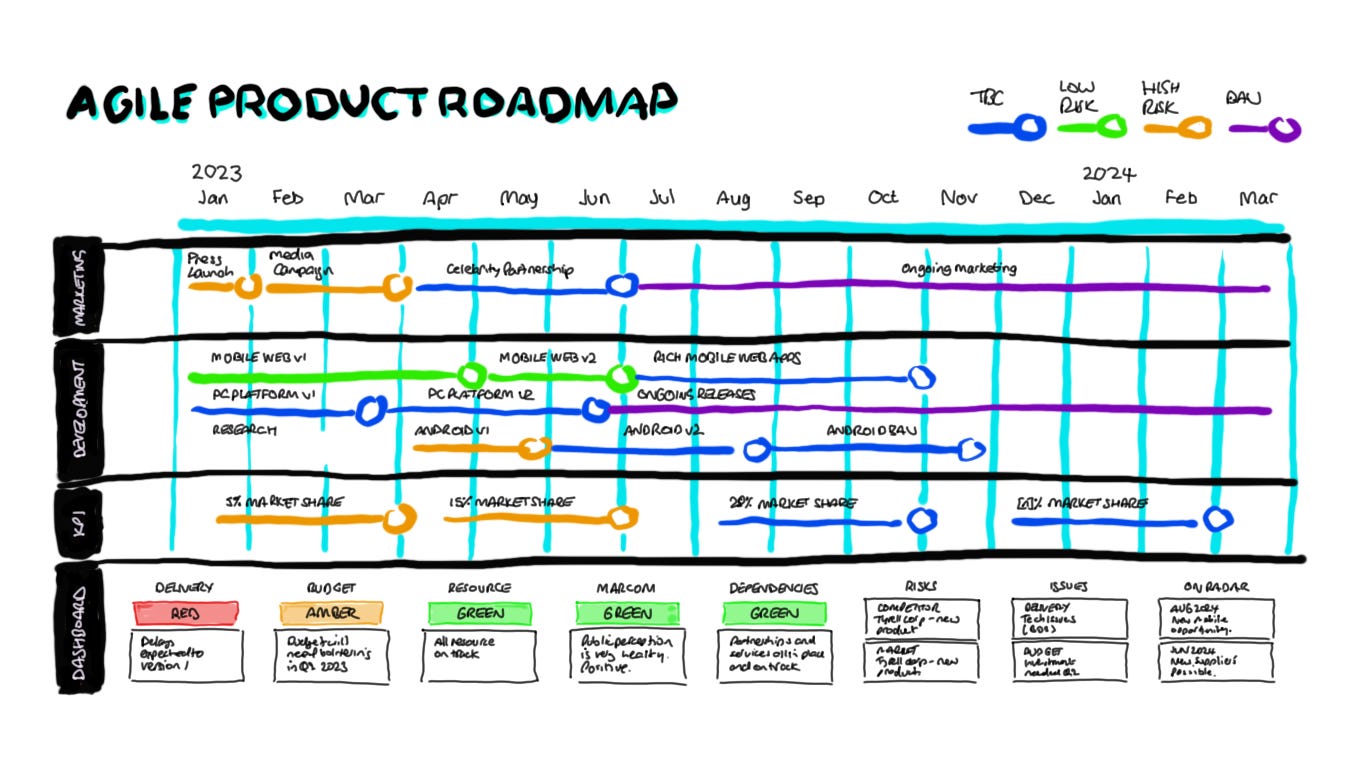
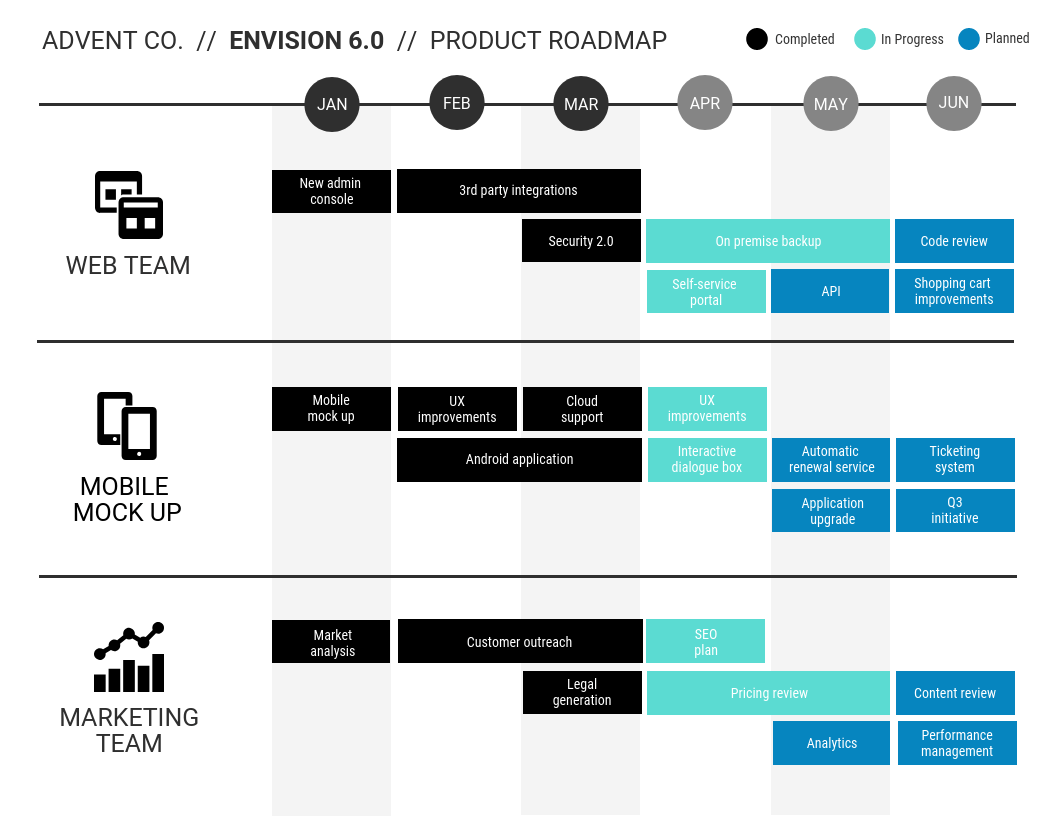
A product roadmap is a visual map of the direction that your product offering is going over time, such as over the next 6 months, 12 months or longer. It reveals your vision for your products as well as your product strategy, which should tie back to your company strategy.

The product roadmap is a guide to help you and the team execute on the strategy, making sure everyone is aligned and working toward a common goal. It’s also useful to show to customers, so they will understand what they will be able to get in the future if they buy your product now.
As a startup, you’ll eventually want to show your product roadmap to potential investors as well. It shows that you have a strategy and a plan to deliver. Investors will believe you have your act together.
The product roadmap does not have to only focus on multiple products; it can also be focused on a single platform and share what new features and functionality as enhancements will be rolled out on the platform in the months and years ahead, such as mobile support, XU improvements and online shopping cart improvements.
Agile development has affected product roadmaps in recent years. Traditionally, product roadmaps would get locked in for 18 months or longer, but agile product development methods have made it much more common for product roadmaps to be a “living document” and be tweaked multiple times a year. Your roadmap should be responsive to changes in customer feedback and the competitive landscape.
Example
If you were hanging out with Steve Jobs on the Apple campus 20 years ago and got to see Apple’s product roadmap, you may have seen the plan for iTunes, the iPod, the iPhone and the iPad. The product names may not have existed at the time, but Jobs had a long-term product roadmap with the concepts for new, innovative products that would change the way people live, work and play.
You don’t need to try to match Steve Jobs and Apple to be successful in your own right. But you can start with a calendar view of the months or years ahead, start to chart out what development work will be done and start to put deadlines to when each new feature for your product will be available for testing.
It can be exciting to create your first product roadmap because it lays out your vision for your products of the future. Don’t be surprised if you get inspired by it.
That’s it. If you enjoying it and get some insights and want more just subscribe below.